
How to play 1LEFT with friends in your browser
If one of you is on a phone and the other is on a computer, you can still join the same public match. The three choices that matter are the mode, map and server region.
Try a match together
These links open Team Deathmatch on Dust Yard. Pick one coast and send that same link to your friend. Open it around the same time. Each of you can join as a guest.
The link selects a public matchmaking pool. Other players can join, teams are assigned by the game, and a full room can put the next arrival into a different match.
Pick another map or mode
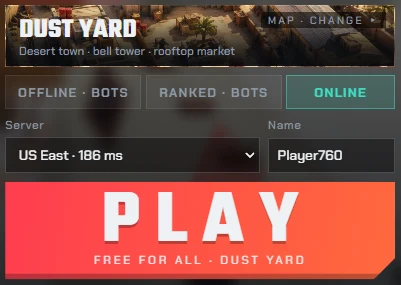
- Open 1LEFT and choose the same map under Map · Change.
- Select the same mode. Team Deathmatch has two teams. Free for All lets everyone compete individually.
- Choose Online and pick the same named Server on both devices. Auto can choose different regions for different players.
- Each player selects Play. Compare the names on the scoreboard once you load in. Hold Tab on desktop or tap the score bar on a phone.
If you miss each other
Check the server name first, especially if one player is traveling. Then check the map and mode. Matchmaking prefers the fullest room with an opening. In Battle Royale, both players must also arrive while the room is still accepting players for the flight. For an easier first meeting, choose Deathmatch, which accepts players during the round.
Compare the Deathmatch modes or find the scoreboard on your device.