1LEFT / How to play
Controls
Learn the keyboard shortcuts for your first match, or see where the map, backpack and reload button live on a phone.
Game access currently requires a password.
Keyboard & mouse
- Move and sprint
- W A S D move. Hold Left Shift while moving forward to sprint.
- Jump, crouch and slide
- Space jumps. Hold Left Ctrl to crouch, or press it while sprinting to slide. C dashes.
- Look, aim and fire
- Move the mouse to look. Hold the right mouse button to aim down sights. The left mouse button fires.
- Reload and switch
- R reloads. Scroll the mouse wheel to cycle through available weapons, or press 1 for your primary and 2 for your sidearm.
- Grenade and melee
- Hold G to prepare a frag grenade and release to throw. Press V for a quick knife strike.
Touch controls
Move with your left thumb, look with your right
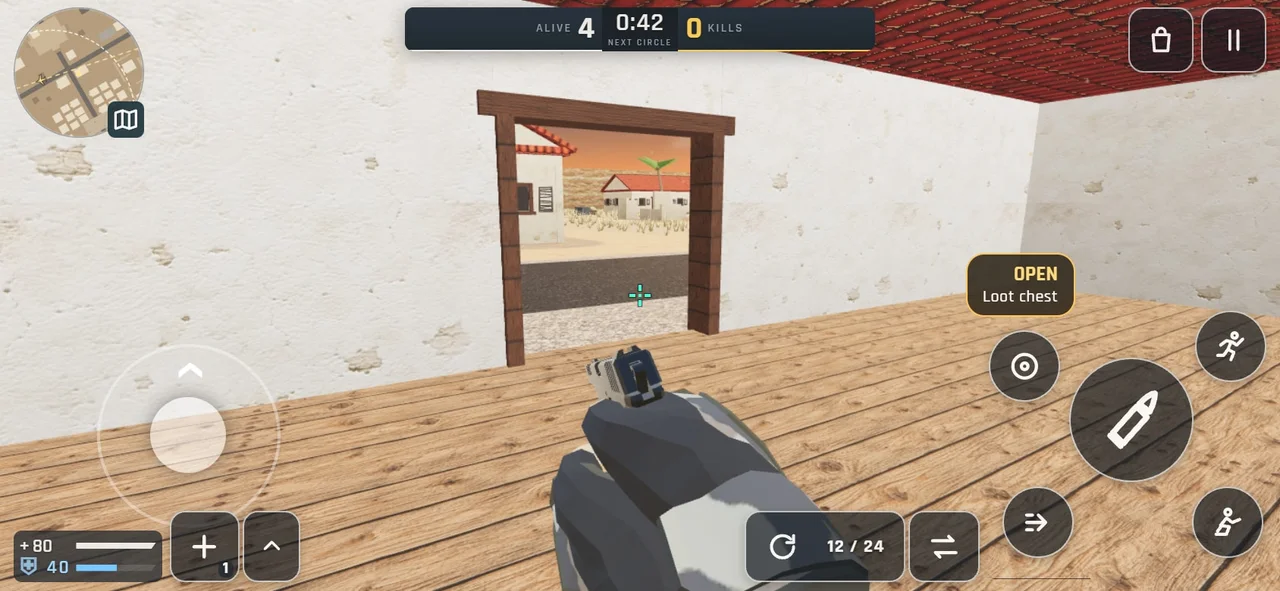
Hold your phone sideways. Drag the stick forward to move and push it farther forward to sprint. Swipe the right side of the screen to turn. Tap the sight button to toggle aim. The large bullet button fires, and the button showing your ammo count reloads.
Make the layout fit your hands
Open Settings, then Touch Controls. Choose a floating or fixed movement stick, adjust look and aiming sensitivity, or turn auto fire off for manual shots. Select Edit Layout, drag the buttons into place, then tap Done to save.
Scoreboard, map and backpack
Deathmatch
Hold Tab to see the scoreboard. On touch, tap the score bar at the top and tap it again to return. When radar is charged, press X or tap Radar. See the Deathmatch rules and score limits.
Battle Royale
Press Space or tap Jump when the plane enters the map. Once on the ground, use E at the interaction prompt, Tab for your backpack, M for the full map and H to use a med kit you carry. On a phone, tap the nearby item prompt, the bag icon or the minimap. The arrow beside the quick item lets you choose Med Kit or Frag. See the Sandstone drop and looting guide.